
Frequently Asked Questions
Here you can find any possible answers to your questions.
As you probably know, WordPress is open source software and licensed under the GPL, theme and plugin developers who create derivative works (i.e software that relies on WordPress to function) are encouraged to adopt the same licensing structure as WordPress, and many do.
This grants users certain rights regarding modification, use and distribution of source code.
The GPL allows users to use, share, modify and redistribute software as they please. This enables us to redistribute software developed by authors such as WooThemes, Gravity Forms, WPML & more for a much lower price than charged by the original authors.
Additionally, every plugin author references and acknowledges that their software is licensed under the GPL within their terms and conditions. Theme Canal is well within the bounds of the GPL license which allows anyone to sell copies of a GPL program for funds (see here).
We are able to offer low prices because we don’t provide support or automatic updates. We do provide updates as released, but you have to apply them manually. So it means that if you require an account at gravityforms.com, and a license key for automatic updates, you should purchase directly from the plugin author.
If you require support or automatic updates, you should opt for the plugin author.
For security and quality-assurance purposes, all available plugins and themes come from the vendors.
We do not provide any license keys.
Plugins and Themes are open source, so they don’t require any license keys unless you want to subscribe to the plugin author’s support and automatic update service.
If you need support or automatic updates, you should opt for the plugin author.
It’s a great alternative to purchase from Theme Canal as you should always avoid downloading free/illegal (nulled) versions of WordPress and WooCommerce themes, plugins and/or extensions as they may contain malicious code or viruses that may hard your WordPress website or blog. All of our downloads 100% safe.
Although we do not provide support, when you buy with us you can have ease of mind that you are downloading a clean product.
By purchasing through Theme Canal, you are abiding to our Refund Policy that is found on our Terms & Conditions that is agreed upon checkout and completing your purchase. It states the following exception scenario:
If a wrong product is purchase in the means of accidental manner, you may contact us to request a refund after the following condition is met: The product(s) purchased may be downloaded a total of 0 (zero) times. At this point, we will revoke the download permissions and issue the refund. All refund requests are issued and processed within 5-7 business days.
We completely understand the frustration if this case were to present itself.
By purchasing through Theme Canal, you are abiding to our Refund Policy that is found on our Terms & Conditions that is agreed upon checkout and completing your purchase. It states the following:
If a product purchased deems non-functional and/or presents errors, please contact us as part of our flagging procedure and we shall send you new/refreshed file(s). If the issue(s) persist; ensure to exhaust all troubleshooting options by checking the Authors/Publishers domain for any known issues or causes. If a resolution is not reached, simply contact us a final time. We will follow-up with you and kindly ask that you provide screenshots and the steps taken to reach the said error. This is part of our Proof Act.
If the outcome deems that the file is in fact functioning, however not compatible with your website’s current settings/set-up (hosting server, WordPress version, etc); unfortunately we cannot issue any refunds for the purchase, as the product is not at fault and sales are final.
Outdated file(s): Sometimes we may be a tiny bit behind on updating one or two products. If you happen to purchase a product and you notice the file(s) are outdated to the current version release, please reach-out to us and let us know. We will respond within 24-48 hours and have the product updated on your account as soon as possible. Refunds are not applicable in this case as the file(s) purchased are honoured with the updated version to you.
Anytime you install a file, you’ll sometimes be prompted to input a license key. The reason for this is because it allows you to access automatic updates from your WordPress dashboard. However, a license key is not required for the plugin to function. This prompt can be ignored.
You can also Disable Admin Notices individually using this plugin.
The most common reason for this is due to the possibility of a minor bug. In any event, if you aren’t able to download the file, send us an email and we will resolve the issue.
If your question is not answered above, contact us and we will answer as soon as we can. Please note that we receive a lot of emails each day, many asking something similar to these questions. Therefore, sometimes we will not be able to spend the time necessary to repeat them and will reply with a message that instructs users to see our F.A.Q.
Fortunately, yes. If a wrong product is purchase in the means of accidental manner, you may contact us to request an exchange after the following condition is met: The product(s) purchased may be downloaded a total of 0 (zero) times. At this point, we will revoke the download permissions and issue permissions for the new product (*Must be equal value). All exchange requests are issued and processed within 2-3 business days.
Upgrading WordPress Plugins Manually
- First back-up your WordPress site if you haven’t already.
- Download a ZIP file of the plugin you need to upgrade. You can usually find most plugins on the plugin repository along with a link to download the newest ZIP file.
- Unzip the plugin onto your local machine. It will create a directory called ‘plugin-name’ with all the files under it.
- Use an FTP program of your choice to delete the existing plugin directory from the wp-content/plugins/ directory on your site.
- Replace the deleted directory by uploading the unzipped plugin to the wp-content/plugins/ directory leaving it in a directory that looks like (for example) wp-content/plugins/plugin-name
- Sign in to your WordPress site. Go to the ‘Plugins’ menu and verify that the plugin you upgraded is the newest version.
Upgrading WordPress Themes Manually
Note, if you are running a customized theme you will lose any customizations if you simply overwrite your theme with a new one. In this case you will need to work with a developer to integrate your customizations into your new WordPress theme instead of just overwriting the old theme. If you have not customized your theme’s code and have merely customized it using the web admin interface that WordPress provides (without changing any of it’s files), then you can follow the procedure below:
- First create a backup of your WordPress site.
- Download a ZIP file of the theme you plan to upgrade.
- Unzip the theme files onto your local machine.
- Use an FTP program of your choice to delete your existing theme directory from the wp-content/themes/ directory.
- Replace the deleted directory by uploading the unzipped theme into your wp-content/themes/ directory. You should now have a structure that looks something like wp-content/themes/theme-name/
- Sign into your WordPress site. Go to Appearance > Themes and verify you are running the newest version of your theme.
OR
WordPress has a built-in feature to install themes and plugins by supplying a zip file. Unfortunately, you cannot upgrade a theme or plugin using the same process. Instead, WordPress will say “destination already exists” when trying to upgrade using a zip file and will fail to upgrade the theme or plugin.
A great plugin to help with this process is Easy Theme and Plugin Upgrades
Easy Theme and Plugin Upgrades fixes this limitation in WordPress by automatically upgrading the theme or plugin if it already exists. While upgrading, a backup copy of the old theme or plugin is first created. This allows you to install the old version in case of problems with the new version.
Updates are provided if and when they are made available from the original author.
All of our products come with 1 year of updates from purchase date and are also available to holders of the Theme Canal Pro Membership. If customers continue their subscription after the one month period has lapsed, they will continue to receive updates up until the subscription expires.
You may download your file(s) as many times as you wish; but please keep in mind the following:
All downloads expire 365 days (1 year) after purchase; with the exception of all files associated with a Theme Canal Pro Membership.
Our membership requires you to be signed-in. Once logged in, you can access your files directly on the product pages.
If you experience any issues accessing your account or files, don’t hesitate to contact us. Please provide your order number, which was sent to you via email when you placed your initial order. We’re always here to help.
All membership sales are final. We do not offer refunds for any recurring payments, including renewals.
Our checkout process is clear, deliberate, and user-driven—designed to prevent accidental purchases or disputes. If your plan includes automatic renewal, it is your responsibility to cancel your membership before the renewal date if you no longer wish to continue.
Kowever, we do offer a 24-Hour Money Back Guarantee for cases where a genuine issue has occurred. To qualify, you must submit a request via our Contact Support Portal within 24 hours of your initial purchase, along with clear screenshots or a screen recording detailing the problem.
For instructions on how to cancel your membership, see: “How do I cancel my Theme Canal Pro membership?”
To cancel your membership, follow these steps inside your Theme Canal account:
- Log in and go to My Account.
- Click Membership Details.
- Select your active subscription.
- Under Subscription Info, click Cancel.
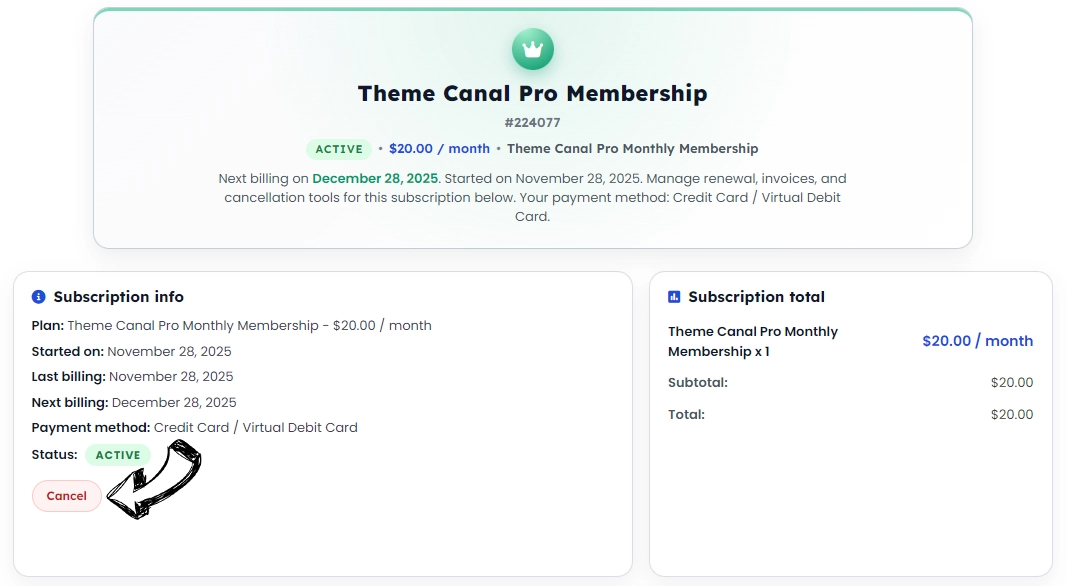
If you paid through PayPal, you may also cancel the recurring billing directly there:
- Log in to PayPal.
- Go to Settings.
- Select Payments.
- Click Manage Pre-Approved Payments.
- Choose the Theme Canal subscription and click Cancel.
Important: Cancellations must be completed at least one day before the next scheduled payment to avoid being charged.
Refunds: Theme Canal Pro memberships are non-refundable. This is clearly stated before purchase on our Theme Canal Pro sign-up page:
https://www.themecanal.com/theme-canal-pro-membership/#faq-210081
And in our Refund Policy:
https://www.themecanal.com/refund-policy/
No, downloading the same product multiple times on the same day will only count as one download towards your daily limit. For example, if you download “Product XXX” three times in a day, it will be counted as one download. You can check your daily credit limits in your account under My Account > My Pro Membership Subscription.
Most users typically require no more than 15–25 files a day. If you need more, we now offer the Developer Monthly Plan for increased download capacity.
If you wish to cancel your Pro Membership due to these changes, you can do so by visiting My Account > My Pro Membership Subscription and clicking on your active subscription.