
Frequently Asked Questions
Here you can find any possible answers to your questions.
Our membership requires you to be signed-in. Once logged in, you can access your files directly on the product pages.
If you experience any issues accessing your account or files, don’t hesitate to contact us. Please provide your order number, which was sent to you via email when you placed your initial order. We’re always here to help.
All membership sales are final. We do not offer refunds for any recurring payments, including renewals.
Our checkout process is clear, deliberate, and user-driven—designed to prevent accidental purchases or disputes. If your plan includes automatic renewal, it is your responsibility to cancel your membership before the renewal date if you no longer wish to continue.
Kowever, we do offer a 24-Hour Money Back Guarantee for cases where a genuine issue has occurred. To qualify, you must submit a request via our Contact Support Portal within 24 hours of your initial purchase, along with clear screenshots or a screen recording detailing the problem.
For instructions on how to cancel your membership, see: “How do I cancel my Theme Canal Pro membership?”
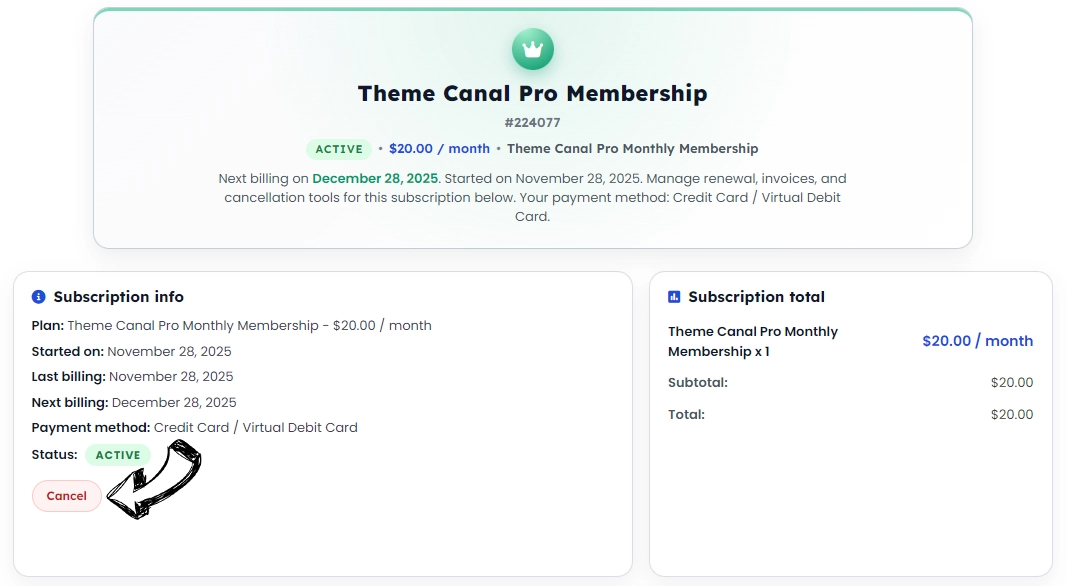
To cancel your membership, follow these steps inside your Theme Canal account:
- Log in and go to My Account.
- Click Membership Details.
- Select your active subscription.
- Under Subscription Info, click Cancel.
If you paid through PayPal, you may also cancel the recurring billing directly there:
- Log in to PayPal.
- Go to Settings.
- Select Payments.
- Click Manage Pre-Approved Payments.
- Choose the Theme Canal subscription and click Cancel.
Important: Cancellations must be completed at least one day before the next scheduled payment to avoid being charged.
Refunds: Theme Canal Pro memberships are non-refundable. This is clearly stated before purchase on our Theme Canal Pro sign-up page:
https://www.themecanal.com/theme-canal-pro-membership/#faq-210081
And in our Refund Policy:
https://www.themecanal.com/refund-policy/
No, downloading the same product multiple times on the same day will only count as one download towards your daily limit. For example, if you download “Product XXX” three times in a day, it will be counted as one download. You can check your daily credit limits in your account under My Account > My Pro Membership Subscription.
Most users typically require no more than 15–25 files a day. If you need more, we now offer the Developer Monthly Plan for increased download capacity.
If you wish to cancel your Pro Membership due to these changes, you can do so by visiting My Account > My Pro Membership Subscription and clicking on your active subscription.