

Default WooCommerce emails do their job, but they rarely feel like the store that sent them. You can spend hours refining a storefront, choosing typography, polishing product pages and building a recognizable brand, only for the order confirmation to arrive looking almost completely separate from everything the customer just experienced.
That is the problem YayMail Pro is designed to solve. Instead of editing WooCommerce email templates in PHP or settling for the default styling controls, it gives you a visual drag-and-drop editor for redesigning transactional emails directly inside WordPress.
In this YayMail Pro review, we are looking at what the plugin actually changes, how its visual workflow fits into a WooCommerce store, where its integrations become useful, and just as importantly, what YayMail does not replace.
What YayMail Pro Actually Does
YayMail Pro sits between WooCommerce and the emails WooCommerce already generates. It does not reinvent the transactional email system. Instead, it gives you much more control over how those messages are structured and presented.
That means order confirmations, processing notices, completed-order emails, refunds, account notifications and other WooCommerce messages can be redesigned using a visual interface rather than by overriding template files in a child theme.
The distinction matters because this is primarily a design and customization tool. WooCommerce still decides when a transactional email should be generated, while YayMail controls how the resulting message looks and what content appears inside it.
For stores that have outgrown WooCommerce’s basic email appearance but do not want to maintain custom PHP templates, that is a useful middle ground.
Inside the Drag-and-Drop Email Builder
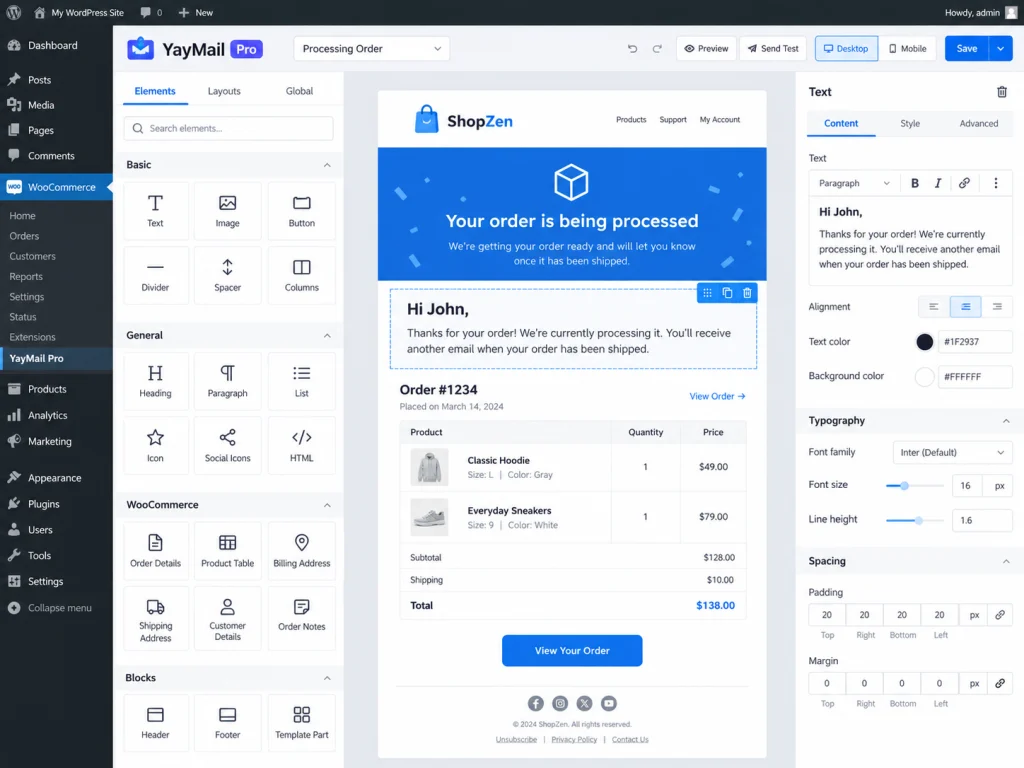
The builder is the main reason to use YayMail Pro. Email layouts are assembled from individual content elements that can be moved around the template and configured visually.
Instead of working directly with an HTML email file, you can build around familiar pieces such as text, images, buttons, dividers, columns, order information and WooCommerce-specific content. Each element has its own settings, while the email itself remains visible as you work.
This approach is particularly useful for transactional emails because they tend to contain a mixture of fixed branding and dynamic store information. Your logo, introduction and support links might remain the same, while customer names, purchased products, totals, billing information and order details change with every message.
YayMail lets those two sides live in the same visual design without requiring you to manually reconstruct WooCommerce’s dynamic data.
Previewing Emails with Real WooCommerce Data
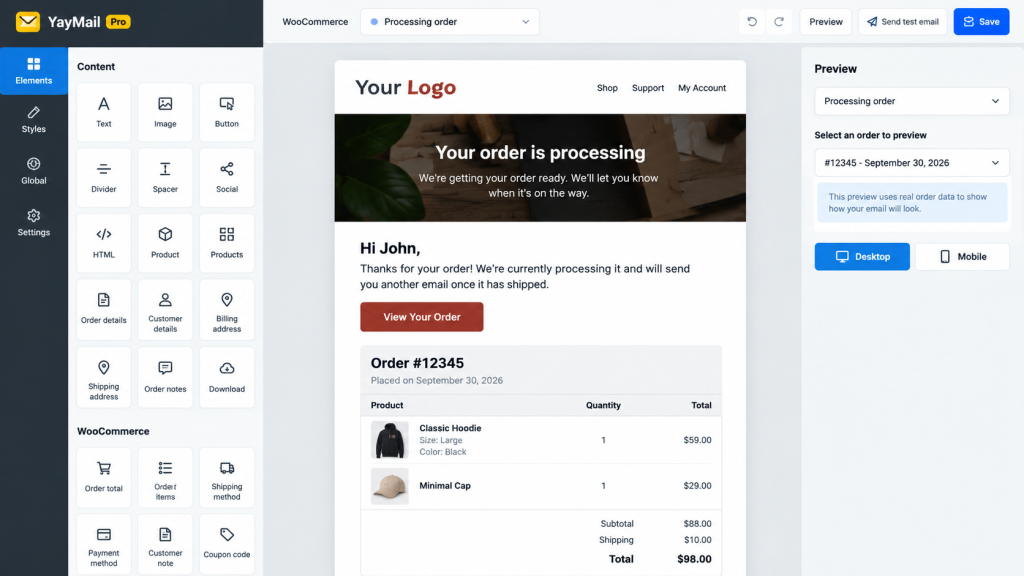
One of the more practical parts of YayMail is its preview workflow. A transactional email can look perfectly fine as an empty design and then fall apart once real products, long customer names, addresses and order totals are dropped into it.
YayMail’s preview tools let you choose an email type and populate the design using sample order data. That makes it easier to judge the template as an actual WooCommerce message rather than as a static mockup.
You can also switch between desktop and mobile previews and send a test email to an inbox before putting the design in front of customers.
That does not eliminate the usual quirks of HTML email clients, but it gives you a much better place to catch problems before the template becomes part of a live order workflow.
Keeping Every WooCommerce Email On Brand
Customizing one order email is easy. Keeping a dozen transactional templates visually consistent is where things normally become tedious.
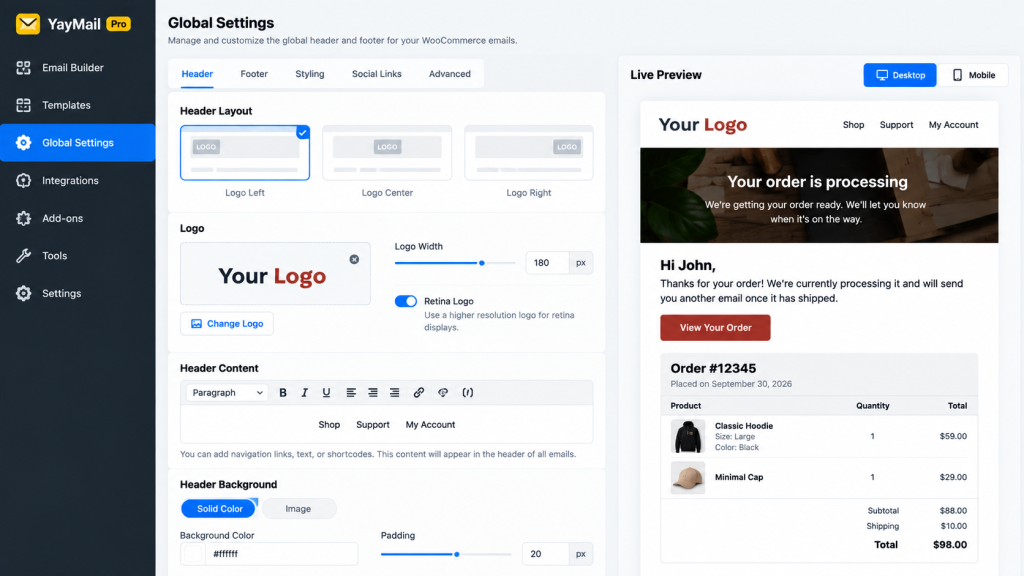
YayMail 4 introduced a more centralized workflow for shared design elements, including a Global Header & Footer area. This lets recurring branding elements be managed in one place rather than recreated individually inside every email template.
For a typical store, that could mean keeping the same logo, contact details, social links, footer information and general presentation across order confirmations, refunds, account emails and administrative notifications.
Premade patterns can also provide a starting point for sections that do not need to be built from an empty canvas.
The benefit here is less about making an email flashy and more about consistency. Transactional messages should still be easy to scan. Customers usually open them because they want an order number, shipment status, download link or account information. Branding works best when it supports that information instead of burying it.
Dynamic Order Data Is Where YayMail Becomes Useful
A WooCommerce email customizer would not be very useful if it only handled static text and images. Transactional emails depend on information coming directly from the order.
YayMail can work with WooCommerce data such as customer information, order details, purchased products and other dynamic values while preserving the visual layout around them.
This opens up some practical possibilities beyond simply changing colors. A completed-order email can place important next steps closer to the order summary. Customer service information can sit somewhere customers will actually see it. Product information can be presented more clearly. Account emails can better match the rest of the storefront.
The goal is not to turn every receipt into a marketing campaign. It is to make the information WooCommerce already sends easier to understand and more consistent with the store around it.
YayMail Pro Integrations and Add-ons Are Not the Same Thing
This is probably the most important distinction to understand before building around YayMail.
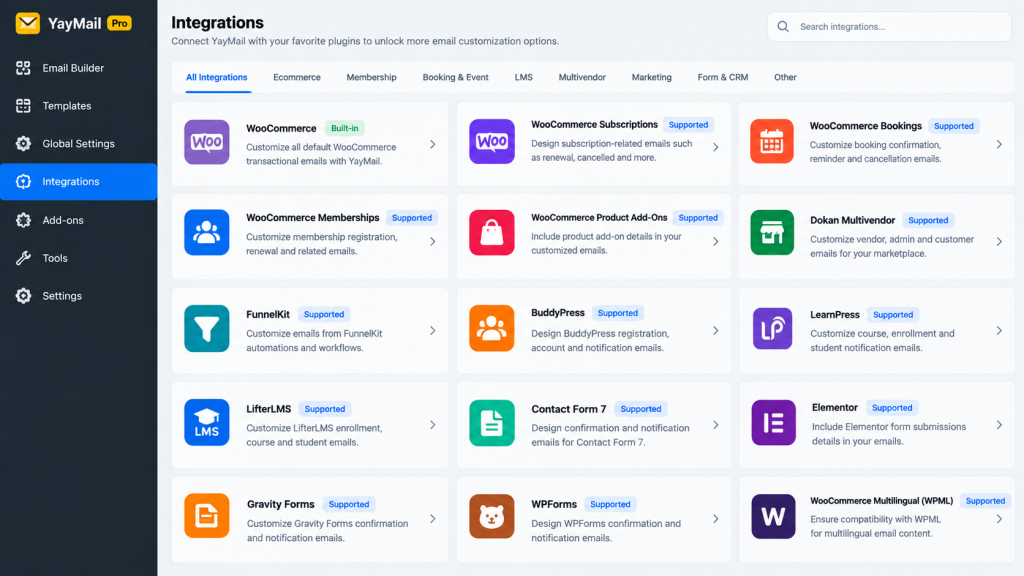
YayMail Pro includes compatibility with a range of third-party WooCommerce and WordPress plugins, allowing additional fields, hooks, attributes and other data from supported extensions to appear inside customized emails.
YayCommerce also offers a much larger collection of dedicated YayMail add-ons for plugins and systems that introduce their own email templates or more specialized behavior.
Those add-ons are separate products. Installing YayMail Pro does not automatically give you the entire YayMail add-on library.
That becomes especially important if your store depends on subscriptions, bookings, memberships, marketplaces, pre-orders, gift cards, advanced order tracking or other extensions that generate their own messages.
Before assuming a particular third-party email can be redesigned, check whether the integration is handled directly by YayMail Pro or requires its corresponding add-on.
What About Conditional Logic?
Conditional content can make transactional emails much more useful. A store might want to display different instructions depending on the payment method, show information only when a certain product was purchased, or add a message for orders above a particular value.
YayCommerce provides this through its Conditional Logic add-on, where email elements can be shown or hidden according to conditions such as products, categories, SKUs, order totals, payment methods, shipping methods, countries and coupon codes.
Again, this is worth separating from the core YayMail Pro feature set: Conditional Logic is a YayMail add-on rather than something to assume is bundled with YayMail Pro itself.
For a straightforward store, you may never need it. For stores with multiple fulfillment paths, payment instructions or product-specific messaging, it can become considerably more useful.
What YayMail Pro Does Not Do
YayMail customizes emails. It does not provide the infrastructure that actually delivers them.
If WooCommerce is generating messages correctly but they are landing in spam, being rejected by recipient servers or disappearing entirely, redesigning them in YayMail is not the fix.
Email delivery still depends on the WordPress mail setup and whatever SMTP or transactional email service your store uses.
This distinction is easy to miss because the design and delivery of an email feel like one process from the customer’s side. Inside WordPress, they are separate jobs.
YayMail handles the presentation layer. Your mail service handles the trip from the website to the customer’s inbox.
It is also worth remembering that a visual preview is not a guarantee that every email client will render a design identically. Transactional emails are still HTML email, complete with the limitations that come with Outlook, Gmail, mobile clients and different screen sizes. Test important templates in actual inboxes before treating them as finished.
Who YayMail Pro Makes the Most Sense For
YayMail Pro makes the strongest case for WooCommerce stores that care about presentation but do not want email customization to become a development project.
It is especially useful when:
- Your WooCommerce emails look noticeably different from the rest of your brand.
- You want to redesign transactional emails without maintaining PHP template overrides.
- You manage multiple email templates and want shared branding to remain consistent.
- You need to preview dynamic WooCommerce order information while designing.
- You build or maintain WooCommerce stores for clients who may need to edit email content later.
It is less compelling if you are completely happy with WooCommerce’s standard emails, only need a small color or logo adjustment, or are actually trying to solve an email-delivery problem rather than a design problem.
Stores built around specialized WooCommerce extensions should also check YayMail’s compatibility and add-on requirements before making it part of the workflow.
Final Thoughts
YayMail Pro solves a fairly specific WooCommerce problem, and that is part of what makes it useful. It does not try to become an email marketing platform, an SMTP service or a full automation suite. It focuses on the transactional emails WooCommerce already sends and gives you a much better way to design them.
The visual builder removes much of the friction from template customization, while real order previews and shared branding controls make the workflow practical for stores with more than one email to maintain.
The main thing to understand is where YayMail Pro ends. Some third-party compatibility is built into Pro, while many specialized email systems require separate YayMail add-ons. Email deliverability also remains the responsibility of your site’s mail setup rather than the customizer itself.
For a WooCommerce store that wants order and account emails to feel like part of the same experience as the storefront, YayMail Pro is a sensible tool to have in the stack. It gives those routine transactional messages considerably more polish without turning every small design change into a template-development job.